
Lock and reopen the months
A locked month protects the books: nothing can be posted into it, and no draft can have a date in it. The Month end page shows the months of the working company that are open or reopened, and the last locked months. You must have the View the fiscal years and months permission.
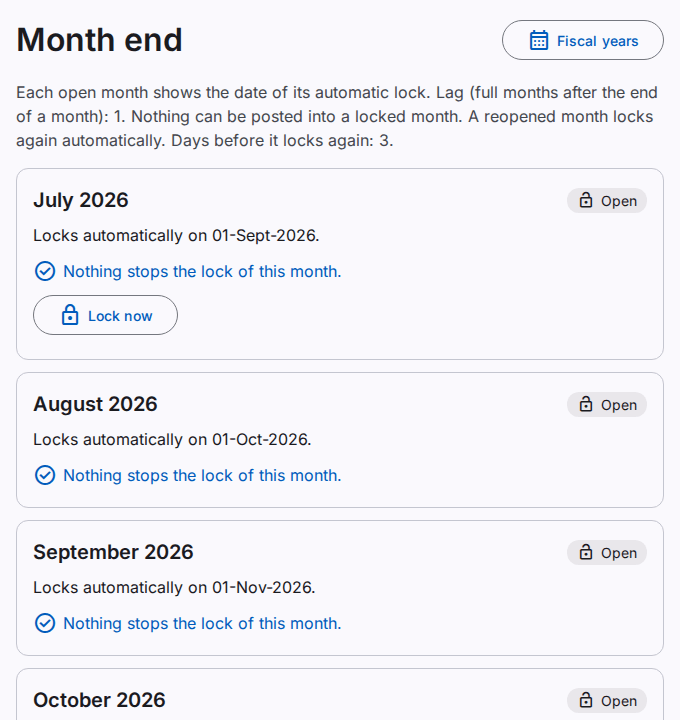
How a month locks
- A month locks automatically when a number of full months have passed after it ends. The default is 1: September locks on 1 November. The company settings can change the number. Refer to Change the settings.
- The system locks the months each night at 02:00, the oldest month first.
- Before the lock, the system posts the valid drafts of the month. It does not do this when the automatic posting is Never. Refer to Correct the drafts that did not post.
- A draft or a posting exception that remains in the month stops the lock. The later months wait. The users who can lock months get one notice each day.
For each open month, the page shows the day of the automatic lock. It also shows the items that stop the lock. Select an item to open the list of these drafts.
Lock a month now
You must have the Lock months permission. The month must be ended, and all the earlier months must be locked.
- Make sure that the month shows "Nothing stops the lock of this month." Post or delete the drafts first.
- Select Lock now.
- Read the message. Select Lock now.
Caution: after the lock, nobody can post into the month. Only an administrator can reopen it.
Reopen a locked month
Reopen a month to correct a document in its own month, for example an invoice with a wrong price. You must have the Reopen locked months permission. This permission is not available in a support session.
- Select Reopen on the month.
- Type the reason. The reason is necessary.
- Select Reopen.
- If the Confirm it is you dialog opens, type your Password. Select Confirm.
In a reopened month, you can post only corrections and reversals. A reversal in a reopened month must be the reversal of a document of that month. You cannot make new drafts with a date in the month. The reopen goes to the security log and to the business history.
A month before the start of the company in the product cannot be reopened. The start is the date of the opening balances.
Lock a reopened month again
The month locks again automatically after a number of days (3 by default). The user who reopened it gets a notice. To lock it before, select Lock again now. A correction draft that is not posted stays a draft; it cannot post after the lock.
The close of the fiscal year
When all the 12 months of a fiscal year are locked, the system closes the year. A month that closes its year shows "The lock of this month closes the fiscal year."
- The system posts the closing entry on the last day of the year. The entry sets each income account and each cost account to zero. It moves the profit or loss to the posting account Retained earnings.
- The year gets the status Closed. The next year needs no opening entry.
- Nobody can post, change or reverse a closing entry.
- If the company has no posting account Retained earnings, the last month does not lock. Set the account on the page Posting accounts. Refer to Set the posting accounts.
When you reopen a month of a closed year, the system reverses the closing entry, and the year is open again. When all the months are locked again, the system posts a new closing entry with the new profit or loss.
The lock history
Open Lock history on a month to see each lock, reopen and blocked lock, with the user, the time and the reason.