
Choose the posting accounts
Automatic postings use the posting accounts, for example the default cash account or the account for rounding differences. The Posting accounts page shows the account of each posting role of the working company. You must have the View the chart of accounts permission to see the page.
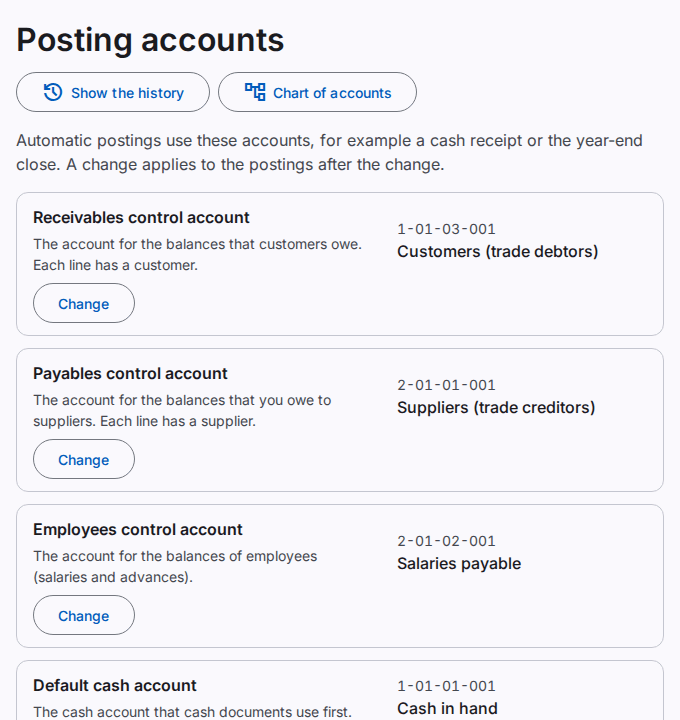
The standard chart sets all posting accounts. An account that a posting role uses has the label System in the chart of accounts. You can change its name, but not its type.
Change a posting account
You must have the Change the posting accounts permission. This permission is not available in a support session.
- In the row of the posting role, select Change.
- Select the Account. The list shows only active accounts of the correct type.
- Select Save.
- If the Confirm it is you dialog opens, type your Password. Select Confirm.
The page shows "The posting account is saved." The change applies to the postings after the change. Postings before the change stay the same.
If the list has no account, add an account of the correct type first. Refer to Manage the chart of accounts.
The posting roles
- Receivables control account: the balances that customers owe. Each line has a customer.
- Payables control account: the balances that you owe to suppliers. Each line has a supplier.
- Employees control account: the balances of employees, for example salaries and advances.
- Default cash account: the cash account that cash documents use first.
- Retained earnings account: at the end of the year, the profit or loss of the year goes to this account.
- Opening balance clearing account: the difference of the opening balances. Its balance must be zero when the opening balances are complete.
- Rounding account: small differences from the rounding to paisa.
- Cash shortage and excess account: differences in a cash handover.
The history of the posting accounts
Select Show the history to see the changes. Refer to See the business history.