
See the fiscal years
A fiscal year has 12 months. Each posting has a date, and the date must be in a fiscal year of the company. The Fiscal years page shows the fiscal years of the working company and the status of each month. You must have the View the fiscal years and months permission to see the page.
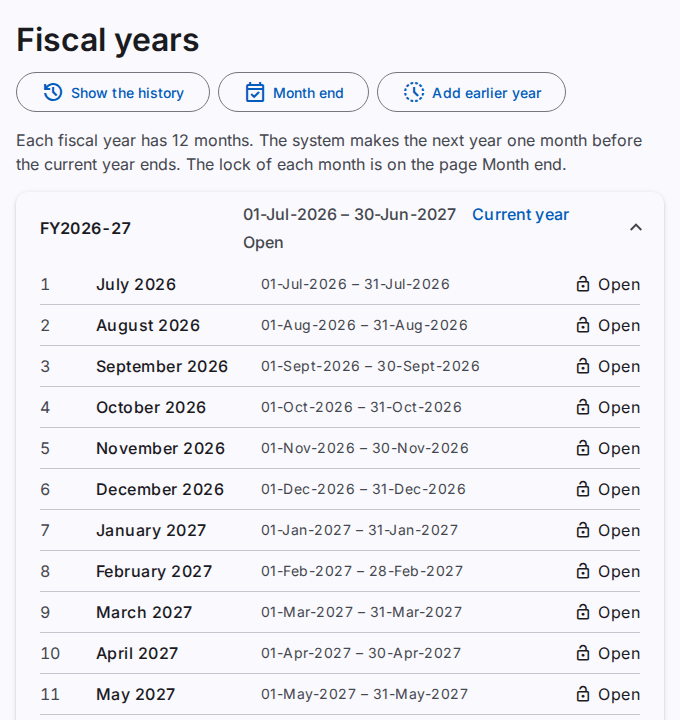
The fiscal year starts in the first month that the company settings show. The default is July, so the year FY2026-27 starts on 1 July 2026 and ends on 30 June 2027.
How the fiscal years start
- A company gets its first fiscal year when it gets its chart of accounts. The first year is the year that contains today.
- The system makes the next fiscal year one month before the current year ends. You do not have to do anything at the end of the year.
- A company without a chart of accounts has no fiscal year. Set up the chart first. Refer to Manage the chart of accounts.
Caution: after the company has a fiscal year, you cannot change the first month of the fiscal year.
Add an earlier year
Add an earlier year only if you must record transactions before the first year. You must have the Add fiscal years permission.
Caution: you cannot remove a fiscal year after you add it.
- Select Add earlier year.
- Read the name of the year in the dialog. Select Add year.
- If the Confirm it is you dialog opens, type your Password. Select Confirm.
The page shows "The fiscal year is added." The new year is directly before the first year. To add more years, do the steps again.
The status of a month
- Open: you can post with a date in the month.
- Locked: you cannot post with a date in the month.
- Reopened: you can post only corrections and reversals with a date in the month.
To lock or reopen a month, open Month end. Refer to Lock and reopen the months.
The status of a year
- Open: the year has a month that is not locked.
- Closed: all the months are locked, and the system posted the closing entry. The year shows the date of the close and the number of the closing entry. Refer to Lock and reopen the months.
The links Income statement and Balance sheet of a closed year open the two statements of the year. Refer to See the income statement and See the balance sheet.
The history of the fiscal years
Select Show the history to see when each fiscal year was made. Refer to See the business history.