
Print and export a report
You can print each report as a PDF file. You can also save it as an Excel or CSV file. A PDF file needs the permission to see the report. An Excel or CSV file needs the export permission, for example Export ledger reports.
Print a report
- Select Print.
- Select the options:
- Language: English or Urdu. The default is the language of your screen.
- Paper size: A4, A5, Letter or Legal.
- Orientation: portrait or landscape.
- Layout: Full print or Paper saving.
- Negative amounts: in brackets or with a minus.
- Show rows without figures.
- More columns, if the report has them.
- Select Print.
The PDF file opens in a new tab. The first page shows the logo, the name and the header lines of the company. Each page shows the page number and the time of the print. Refer to Set the logo and the header of prints.
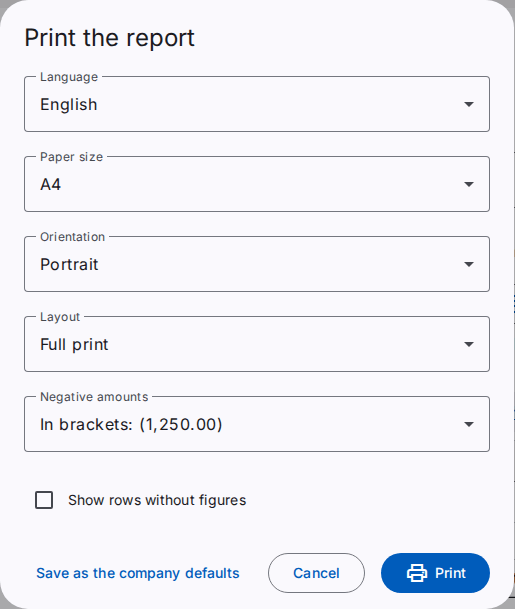
Paper saving uses less space between the rows and does not show rows without figures. The font size is the same in the two layouts. A wide report on A5 paper prints in landscape.
The look of the print comes from the setting Print style of the reports of the company. Refer to Change the settings.
The page keeps your options for the next print of the same report. If you have the Edit company settings permission, select Save as the company defaults to make your options the defaults for all users of the company.
Export a report
- Select Export.
- Select Excel (.xlsx) or CSV (.csv).
The file has one header row and the figures as numbers, without "Dr" and "Cr". The Excel file has a second sheet with the criteria of the report.
Large reports
A report with more than 5,000 rows does not come at once. The system makes the file in the background. When the file is ready, you get a notification. Select it to download the file. You can download the file for 24 hours.
The record of prints and exports
The system keeps a record of each PDF file and each export: the user, the report, the criteria, the language and the time. An export also writes an event to the security log.
To print a journal voucher, refer to Make and post a journal voucher. The history of the voucher shows each print.