
Set off the balances of a party
A party can have two or more roles, for example a customer and a supplier. Each role has its own balance. A set-off moves an amount between two roles of one party. For example, Ali Traders owes you 100,000 as a customer, and you owe Ali Traders 60,000 as a supplier. A set-off of 60,000 makes the supplier balance zero and the customer balance 40,000.
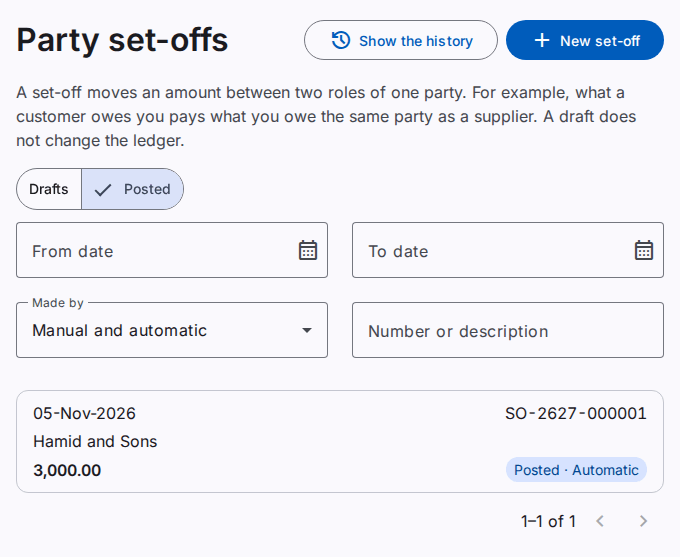
With Automatic netting (the default), the product makes these set-offs at each posting. Make a manual set-off when the company uses separate balances.
A set-off is first a draft. A draft does not change the ledger. When you post the set-off, it gets its number (for example SO-2627-000001) and the ledger gets a journal entry.
Make a set-off
You must have the Create party set-offs permission.
- On the Party set-offs page, select New set-off.
- In Party, type the code or a part of the name. Select the party in the list. The list shows only the parties with two or more roles.
- Select the First role and the Second role.
- Type the Date.
- Type the Amount. The page shows the two balances now and the largest amount. Select Use this amount to use the largest amount.
- Type a Description. This field is optional.
- Select Save draft. Or, select Post to save and post.
The two balances must be on opposite sides. For example, a customer who owes you and a supplier that you owe. When the two balances are on the same side, the page shows "There is nothing to set off".
Post a set-off
You must have the Post party set-offs permission.
- Open the draft. Select Post.
Caution: The amount must not be more than the smaller of the two balances on the day that you post. The product checks the balances again when you post.
The posting settles the oldest open items of each role first.
To change a posted document in its own month, use Correct and not a reversal. Refer to Correct a posted document.
Reverse a set-off
You must have the Reverse party set-offs permission.
- Open the posted set-off. Select Reverse.
- Type the Reason. Check the date of the reversal.
- Select Reverse.
The two balances come back. The set-off stays in the list with the status Reversed.
Automatic set-offs
Automatic netting is the default (refer to Settings). A workspace or a company can change to separate balances with manual set-offs. Then the product makes the set-off when a posting gives a party balances on opposite sides. The set-off shows "Automatic" and the posted by name "System".
You cannot change or reverse an automatic set-off. When you reverse the posting that made it, the product reverses the automatic set-off too.
Find a set-off
The page has two tabs: Drafts and Posted. On the Posted tab, the filter Made by shows the manual or the automatic set-offs. You can also filter on the dates and search for a number or a description. The search finds a number that starts with the text. It also finds a description that contains the text. To search a description, type at least 2 letters or digits. When the list has more than 1000 set-offs, the page shows "of more than 1000".