
Manage the companies
The Companies and branches page shows the companies of the workspace. A company is one set of books, with one or more branches. You must have the View companies permission to see the list.
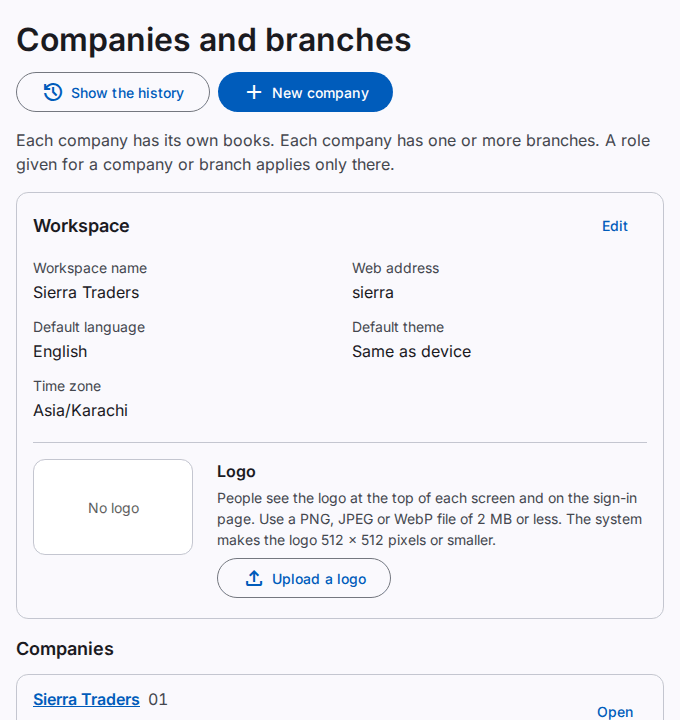
What the page shows
- The Workspace card shows the workspace profile and the logo. Only users with the Edit workspace profile permission see this card.
- The Companies list shows the code, the active branches and the Fiscal year of each company.
- An inactive company has the label Inactive.
- A user with a role for one company sees only that company.
To see one company, select Open. Refer to Manage one company.
Add a company
You must have the Add companies permission.
- Select New company.
- Type the Code. Use 1 to 16 letters A–Z, digits or hyphens.
- Type the Legal name.
- Optional: type the Trade name.
- Select the Time zone.
- Select the First month of the fiscal year.
- Optional: type the NTN, the STRN, the Phone and the Address.
- Under Chart of accounts, select one option:
- The standard chart for a trading business. Then select the Language of the account names.
- A copy of the chart of another company. Then select the Company to copy from.
- Select Create the company.
- If the Confirm it is you dialog opens, type your Password. If the dialog also shows Code from the app, type the code from your authenticator app.
- Select Confirm.
The new company shows in the list. The system also creates the first branch, MAIN, and the chart of accounts of the new company. Refer to Manage the chart of accounts.
Change the workspace profile
- On the Workspace card, select Edit.
- Change the Workspace name, the Default language, the Default theme or the Time zone.
- Select Save.
The default language and the default theme apply to users who did not choose a language or a theme. You cannot change the Web address on this page.
Change the workspace logo
- On the Workspace card, select Upload a logo or Replace the logo.
- Select a PNG, JPEG or WebP file of 2 MB or less.
The page shows "The logo is saved." Users see the logo at the top of each screen and on the sign-in page. To remove the logo, select Remove the logo.
The history of the companies
Select Show the history to see the changes to the companies. You must have the View change history permission. Refer to See the business history.
The limits of your plan
The plan of your workspace limits the number of companies and branches. A new company also adds its branch MAIN. When a limit is full, the system refuses a new company or branch. Refer to See the plan and the usage of your workspace.