
See the account analysis
The account analysis shows the debits, the credits and the net of an account or a group for each month, week or day of a period. You must have the View ledger reports permission to see the Account analysis page.
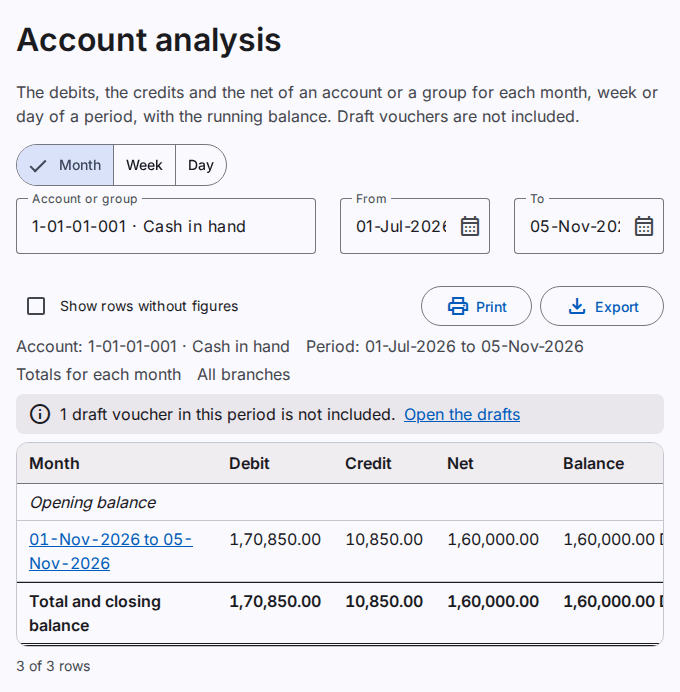
Select the account, the dates and the totals
- Select Month, Week or Day.
- In Account or group, type a part of the code or the name. Select the account in the list.
- Type the first date in From. Type the last date in To.
The report starts when you select an account. When you select a group, the report adds all the accounts of the group. The default dates are the start of the fiscal year and today.
Read the analysis
- The Opening balance row shows the balance before the first date. It includes all the posted entries before that date, also of earlier years.
- Each row shows one month, week or day: the debits, the credits, the net (the debits minus the credits) and the balance at the end of the row.
- A week starts on Monday and stops on Sunday. When the period starts or stops in the middle of a month or a week, the first or the last row shows the dates.
- The last row shows the totals of the period and the closing balance.
A month, week or day without entries does not show. To show it, select Show rows without figures. The analysis includes posted entries only. When a draft voucher has a date in the period, a note above the table tells you.
Open the ledger of a row
Select the month, the week or the day of a row. The account ledger opens for the dates of the row. Refer to See the account ledger.
Print or export the analysis
Select Print to make a PDF file. Select Export to save an Excel or CSV file. Refer to Print and export a report.