
Manage the territories
A territory is a sales area of the company, for example a region of the country or a part of a city. The territories make a tree of up to four levels. Each customer can be in one territory. A company that sells only at the counter does not need territories.
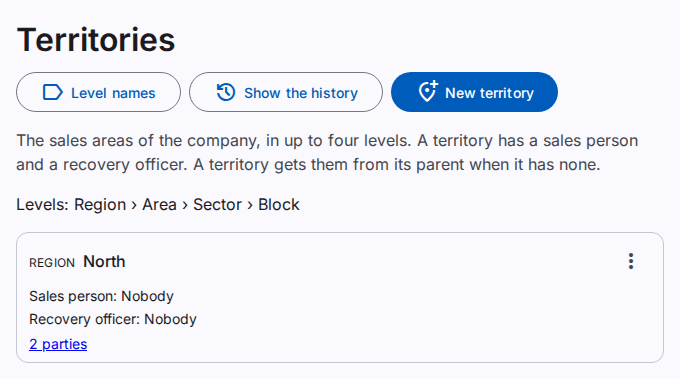
You must have the View parties permission to see the page. You must have the Manage territories permission to change the territories.
Add a territory
- Select New territory. To add a territory under another territory, open the actions of the other territory and select Add … under it.
- Type the Name. The Code is optional.
- Select Save.
To move a territory, select Change the territory and select another territory in Under. The territories under it move with it. The tree cannot have more than four levels.
The sales person and the recovery officer
Each territory can have a sales person and a recovery officer. They can be the same person. The person must be an active employee who is a salesman. Refer to Add or change a party.
- In the actions of the territory, select Set the sales person or Set the recovery officer.
- Select the Person. Select Nobody when the territory has no person from that date.
- Type the date in From.
- Select Save.
The earlier person stays in the records until the day before the new date. Select People and dates to see all the people of a territory.
A territory without its own person gets the person of its parent. The page then shows "(from the parent)". Nobody on a territory stops this.
Field agents
A user can be linked to an employee. When the employee is the sales person or the recovery officer of a territory, the user sees the customers of that territory and of the territories under it. A field agent can add customers only in their own territories.
The names of the levels
The four levels have the names Region, Area, Sector and Block. You can give them other names, for example Zone, Sub-zone, Route and Street.
- Select Level names.
- Type the names for the workspace, or for this company only.
- Select Save.
You must have the Edit workspace settings permission for the workspace names, and the Edit company settings permission for the company names. Leave all four fields empty to use the names of the higher level again.
Deactivate a territory
You cannot deactivate a territory with active territories or active parties under it. First move or deactivate them.